為漫畫分鏡加入動態

動畫漫畫製作器

為漫畫分鏡加入動作、運鏡、視差、時間節奏與場景結構,讓靜態畫面也能延伸成動畫短片。

動畫漫畫提示詞

Prompt to result
Animate a superhero landing panel with dust burst, slow push-in, cape motion, and one dramatic reaction cut.
Generate
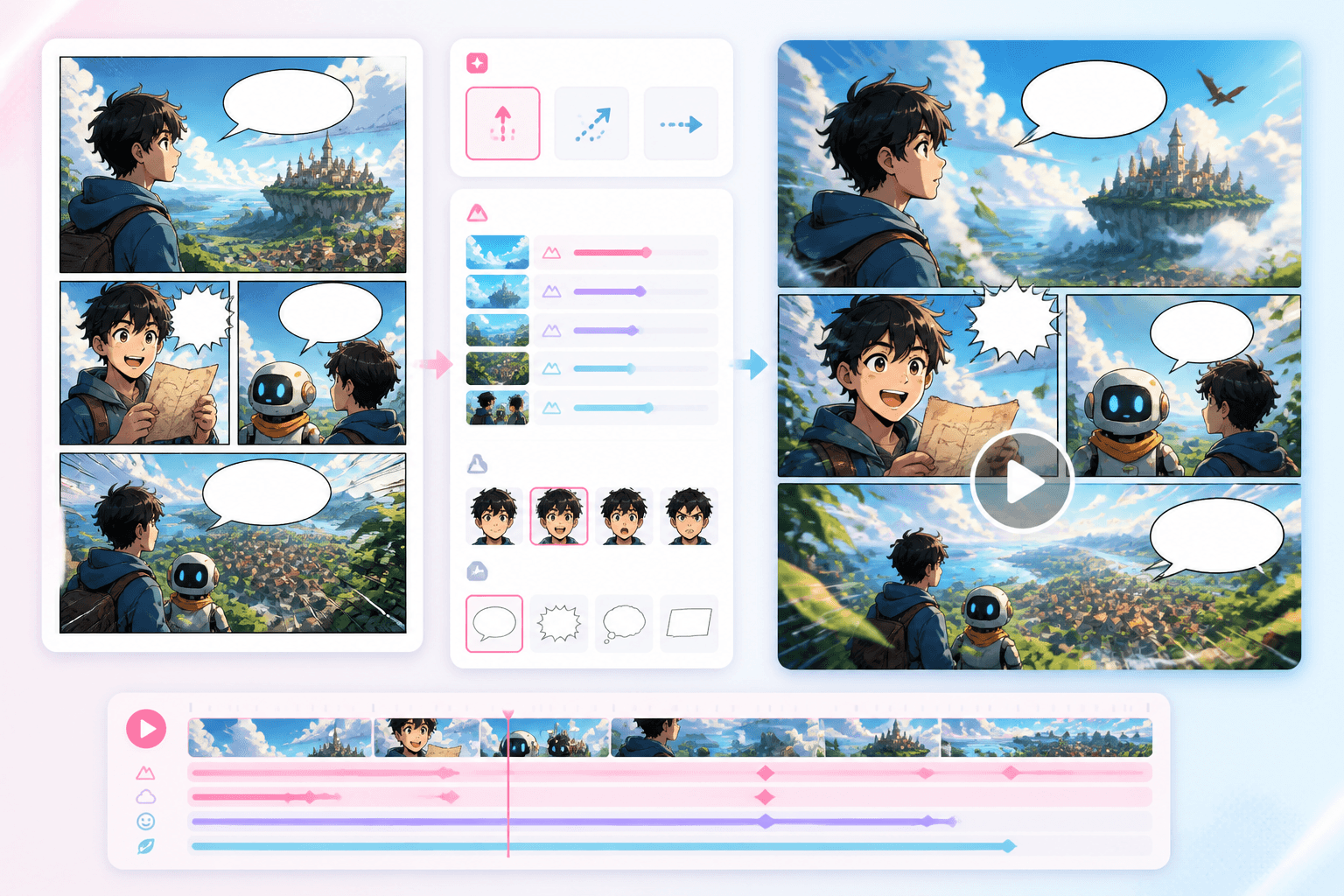
動畫漫畫製作器產品示意圖

動態故事板

漫畫分鏡

轉成動態註記

視差效果

可直接用於影片

01

先準備分鏡

可使用漫畫分鏡、網路漫畫畫格或故事板。

02

加入動態設計

定義運鏡、角色動作、特效與時間節奏。

03

產生動畫輸出

將動態規劃接到影片或動畫工作流程。

專為漫畫素材設計的動畫工作流程。

直接為漫畫分鏡與劇情節點加入動態,不必把整個專案重做進一般影片編輯器。

漫畫分鏡

把單一分鏡、分鏡序列或故事板帶入動態工作流程。

視差
鏡頭移動
動作提示
鏡頭節奏

動畫規劃

檢視動作、運鏡、特效與鏡頭節奏安排。

動畫漫畫製作器動態預覽

動畫漫畫介於漫畫分鏡與影片之間。

創作者需要一個能保留漫畫構圖邏輯,同時加入動態設計的橋接方式。

分鏡可讀性

動態效果應保留原本畫格的敘事重點與閱讀節奏。

圖層移動

視差、運鏡與特效能讓漫畫分鏡更有生命感。

銜接影片製作

動畫註記能把靜態漫畫畫面轉成更適合影片生成的提示詞。

動畫漫畫製作器介面預覽

動態

為靜態分鏡建立動態語言。

在漫畫分鏡與故事板中加入視差、運鏡、動作節點與時間節奏註記。

漫畫分鏡生成器預覽

分鏡

先做出有張力的漫畫分鏡,再進一步動畫化。

先生成清楚易讀的分鏡,再挑選最適合加入動態的關鍵時刻。

Workflow guide

讓你分鏡裡原本的故事動起來。

這個頁面說明如何把漫畫生成銜接到動態設計,包含運鏡、節奏、圖層移動與後續影片製作流程。

01

先準備分鏡

可使用漫畫分鏡、網路漫畫畫格或故事板。

02

加入動態設計

定義運鏡、角色動作、特效與時間節奏。

03

產生動畫輸出

將動態規劃接到影片或動畫工作流程。

動畫漫畫提示詞範例

提示詞可描述原始分鏡、動作、運鏡與片段時長。

Animate a detective close-up with slow push-in, rain streaks, and a subtle eye movement.
Turn a three-panel action sequence into a 10-second animated comic with impact pause.
Add parallax motion to a fantasy webtoon reveal with glowing particles and slow camera rise.

Related writing workflow

Move the draft into screenplay form.

Use the AI Screenplay Editor when a script, fiction draft, storyboard brief, video idea, or canvas note needs proper scene headings, action, dialogue, parentheticals, cover pages, outlines, beats, and collaboration-ready revisions.

Hollywood formattingOutline, cover, and beatsAdvisor notes
Explore AI Screenplay Editor
Screenplay passReady

INT. COMMUNITY CENTER - NIGHT

Folded chairs. A storm outside. MAYA stands at the microphone with a page of notes she no longer needs.

MAYA

If the city will not read the record, we will read it out loud.
FormatHollywood
Beatslinked

動畫漫畫製作器常見問題

讓你的漫畫分鏡動起來。

從單張分鏡或故事板開始,加入動畫漫畫場景所需的動態設計。